
MoBill Budget and Reminder
MoBill AppsFinance
4.01.56K Reviews
- Version
- 5.3.1
- Installs
- 500.00K
- Age Rating
- Everyone
Screenshots
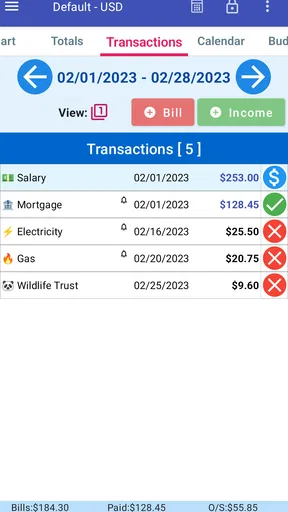
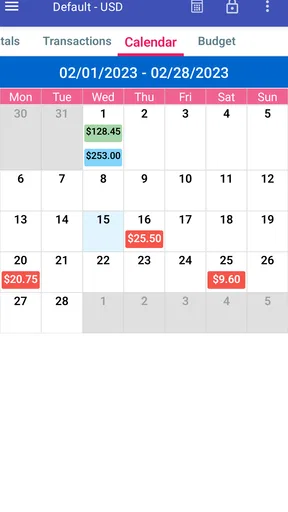
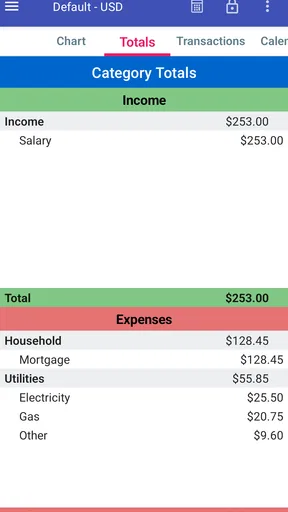
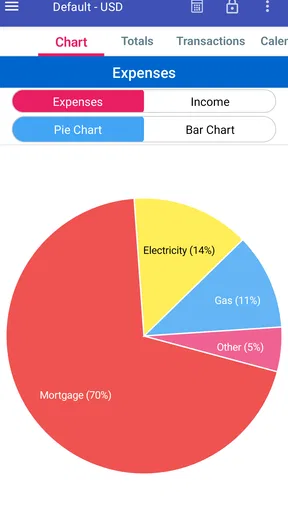
Our Review of MoBill Budget and Reminder
 Analysis by Appyee
I found MoBill Budget and Reminder most useful when I treated it as a quiet daily habit rather than a complete financial command center. It is a finance app from MoBill Apps that focuses on keeping personal spending and upcoming bills visible in one place. After using it, my main impression is clear: it is better suited to someone who wants a straightforward budgeting routine than to someone looking for automatic banking analysis, investment tools, or a polished all-in-one money platform.
That narrower purpose is also its appeal. The app does not need to become the center of every financial decision. Instead, it gives you a practical place to record what matters, think ahead about recurring obligations, and check whether your spending is drifting away from your plan. The experience feels especially appropriate for people who prefer entering information themselves and seeing a simple picture of their finances.
What using MoBill feels like in everyday life
The most convincing way to understand this app is to imagine a normal payday. I would open it after receiving income, review the bills that need attention, and set aside the amounts that should not be spent casually. Later in the week, I could check the budget before ordering food or making an unplanned purchase. That small pause is where the app has practical value: it turns vague financial anxiety into a list of decisions I can actually make.
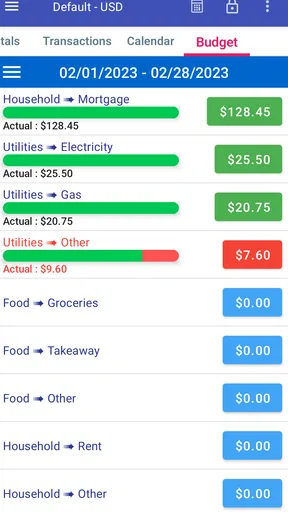
Its store summary describes the purpose simply, but the useful part is the relationship between planning and reminders. A budget alone can tell me that I am overspending. A reminder can tell me that a payment is approaching. Used together, they encourage a more realistic routine: plan the month, watch the categories that tend to expand, and avoid discovering a large obligation only when the balance is already low.
I also like that this approach does not require me to hand over my entire financial life to an automated service. For some users, manual control is reassuring. I can decide what to record, how much detail is helpful, and which expenses deserve attention. That makes the app a reasonable choice for someone who wants awareness without building a complicated spreadsheet.
At the same time, manual control creates responsibility. The app cannot make a useful budget from incomplete entries. If I forget several small purchases, the result may look healthier than reality. My best experience came from entering expenses close to the moment they happened, rather than trying to reconstruct a whole week from memory. That is an important trade-off: the app can support discipline, but it cannot replace it.
A good workflow for bills that are easy to overlook
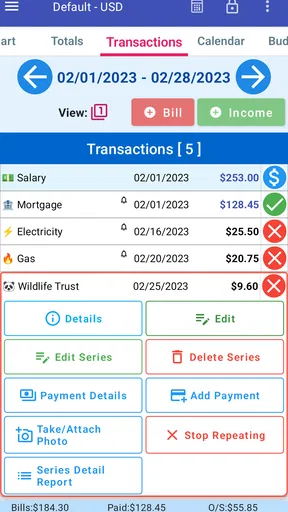
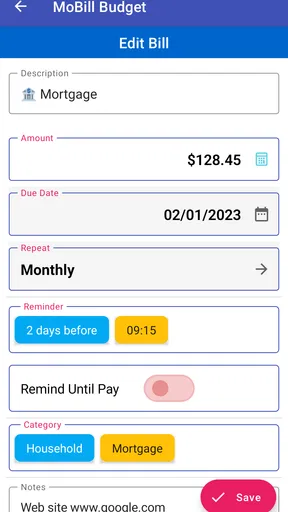
Recurring expenses are where I see the clearest reason to choose this particular app. Rent, utilities, subscriptions, school costs, insurance, and other scheduled payments can become mentally expensive even when they are financially predictable. I found it more useful to think of reminders as protection against timing mistakes, not merely as alarms. The goal is to know what is coming before the money is accidentally allocated elsewhere.
A practical workflow is to enter fixed obligations first, then add flexible spending. Fixed items establish the minimum amount the month will require. Flexible categories can then be judged against what remains, instead of being treated as if every euro or dollar were freely available. This order also helps expose a common budgeting mistake: setting an attractive spending target before accounting for unavoidable commitments.
Another useful habit is to review the upcoming obligations before changing a category. If a month appears unusually comfortable, I would check whether a less frequent payment is approaching before increasing discretionary spending. That is a small but meaningful advantage of keeping reminders beside the budget. It encourages me to judge the whole month rather than the current balance alone.
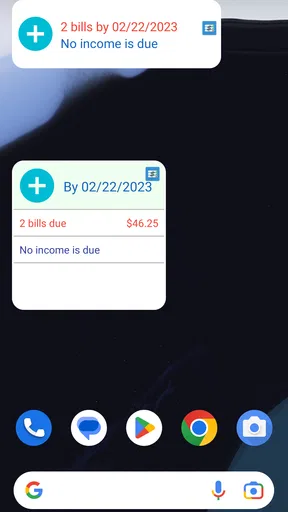
I would not rely on a reminder as my only protection for a critical payment, however. Phone settings, notification behavior, and personal routines can all affect whether an alert gets noticed. For important obligations, I would still keep a second method, such as a calendar entry or a bank alert. MoBill Budget and Reminder works best as part of a dependable routine, not as a reason to stop checking accounts entirely.
Where the hands-on approach helps
Many finance tools try to remove effort through automatic categorization and account connections. That can be convenient, but it can also make spending feel abstract. With a more hands-on app, I am forced to acknowledge individual purchases. That friction is not always a flaw. When I enter a series of small transactions myself, I notice patterns that might otherwise disappear into an automatically generated chart.
This makes the app particularly useful for a person who is beginning to budget. A beginner may not need elaborate forecasting at first. They may need to understand how much disappears into transport, takeaway meals, entertainment, or impulse purchases. Recording those movements manually can teach more than a colorful dashboard if the user is willing to keep doing it.
The same quality can help households with a simple financial structure. Someone managing personal spending, a student tracking a limited allowance, or a couple agreeing on shared monthly limits may appreciate the directness. The app can become a common reference point for planned bills and everyday spending without requiring everyone to learn a professional accounting system.
There is a limit, though. If several people need simultaneous access, detailed permissions, or a fully shared household workflow, I would compare it carefully with a collaborative finance service. A manually maintained budget can become confusing when multiple people edit or report expenses in different ways. The simpler the household arrangement, the more naturally this app fits.
The main weakness: consistency matters more than convenience
The biggest weakness I experienced is not a missing decorative feature; it is the amount of attention the method demands. Automatic finance apps can import transactions and reduce the chance that I forget a purchase. MoBill Budget and Reminder depends more heavily on me maintaining the record. If I stop using it for several days, the budget becomes less trustworthy precisely when I most need a clear answer.
That means the app is not equally suitable for every personality. A person who dislikes manual entry, has many accounts, or makes frequent cash purchases may find the process tiring. Someone with irregular income may also need more flexibility than a simple monthly planning habit can provide. The app can still help in that situation, but it requires more frequent adjustments and more careful interpretation.
I also would not confuse a budget view with a complete financial analysis. Planning spending is different from understanding debt costs, building long-term savings projections, comparing investments, or preparing formal records. Those tasks normally call for specialized tools. MoBill has a sensible role, but it should not be judged as if it were designed to replace every other financial service.
The interface is best approached with modest expectations. Its value comes from the information I put into it and the routine I build around that information, not from a dramatic visual experience. Users who want extensive graphs, automatic insights, or a highly guided coaching system may prefer a more modern, feature-heavy alternative. I would choose this app for control and simplicity, not for presentation alone.
Who should use it, and who should look elsewhere
I would recommend it first to people who want a personal budget they can actively maintain. It is a good match for someone who has recurring bills, wants reminders close to the budgeting process, and prefers deciding how expenses are recorded. It also makes sense for anyone who has tried a spreadsheet but found it too open-ended. The app gives that person a more focused place to return to throughout the month.
It may also suit a user who is uncomfortable connecting financial accounts to third-party services. Manual entry takes more effort, but it offers a feeling of control over what is included. That can be valuable for people who want a private, deliberate overview rather than a constant stream of imported transactions.
I would be more cautious about recommending it to someone who wants everything automated. If the ideal experience is opening an app and immediately seeing every transaction categorized, this is probably not the right direction. The same applies to users seeking investment tracking, advanced debt planning, tax preparation, or detailed shared-account management. A dedicated tool in one of those areas would likely be a better choice.
It is also worth considering the age of the device. The app supports Android version 8.0 and later, so users with older phones should check compatibility before planning around it. For supported devices, the current release is version 5.3.1. I would keep the app updated when possible, especially for a finance tool where reliability matters more than novelty.
Cost, audience, and the practical commitment
MoBill Budget and Reminder is free to install, which makes it easy to test without committing money upfront. Optional in-app purchases range from around two and a half dollars to nearly eleven dollars per item. I would begin with the free experience and only consider an upgrade after establishing a real routine. Paying for options I rarely use would not improve my budget; consistent use would.
The Everyone age rating makes the app broadly approachable, although financial maturity still matters more than the label. A younger user can learn useful habits from it, but they may need help understanding the difference between available cash and money already reserved for bills. The tool can display a plan; it cannot teach every financial concept by itself.
Its audience reach is substantial, with over half a million installs, while the average rating sits at four out of five from around three thousand eight hundred ratings. Those figures suggest a generally positive reception without implying that the app will suit every budgeting style. I read them as evidence that the straightforward approach works for many people, not as a guarantee of a perfect experience.
The app has been available since February 28, 2011, which gives it a long history in a category that has changed significantly. That longevity is reassuring in one sense: the concept has had time to prove useful. It also explains why some users may find the experience less aligned with newer finance apps built around automation, rich visualizations, and account synchronization. I see that as a choice of philosophy rather than an automatic failure.
How I would set it up for the first week
I would avoid entering every possible category on the first day. I would begin with the bills that must be paid, then add only the spending groups that influence my decisions. Too much detail creates work without necessarily creating understanding. A smaller set of meaningful categories is easier to maintain and more useful when I review the month.
Next, I would record the timing of obligations carefully. A budget can look correct in total while still producing a cash-flow problem if several payments arrive close together. Checking the calendar of reminders against expected income is one of the more important habits I would build. It shifts the question from “Can I afford this this month?” to “Will the money be available when it is needed?”
During the first week, I would enter purchases as soon as practical and then review them once at the end of the week. That two-step process is more effective than waiting until the end of the month. The immediate entry protects accuracy, while the weekly review reveals whether a category is growing faster than expected. It also gives me time to adjust behavior before the budget is already lost.
Finally, I would treat the first month as observation rather than judgment. A budget built from guesses may be unrealistic. After seeing actual spending, I could change categories and reminder timing to reflect real life. The useful question is not whether the first plan looks perfect, but whether the app helps me make the second plan more honest.
My final recommendation
After using it, I see MoBill Budget and Reminder as a focused, practical finance app with a clear strength: it connects everyday budgeting with reminders for upcoming obligations. That combination can make a real difference for people who lose track of bills or want a simple way to stay aware of spending. Its manual nature can even be an advantage when the goal is to build financial attention rather than outsource it.
Its limitations are equally clear. It asks for consistency, and it is not the best match for users who expect automatic account aggregation, sophisticated analysis, or a complete financial planning suite. I would not install it expecting a hands-free experience. I would install it because I want a manageable routine that I am willing to maintain.
My verdict is positive, with a specific condition: choose MoBill when deliberate, manual budgeting is more valuable to you than automation. It is free to try, suitable for a broad audience, and developed by MoBill Apps, but its real success depends on regular use. For a person who wants to see bills before they become emergencies and understand spending through active tracking, it is a sensible recommendation. For someone seeking a fully connected financial dashboard, I would look for a more automated alternative instead.
Verdict
Strengths of MoBill Budget and Reminder
- Simple interface makes tracking bills and spending easy.
- Custom reminders help prevent missed payment deadlines.
- Supports recurring expenses for regular bills and subscriptions.
- Useful overview of upcoming payments and monthly obligations.
- Can improve awareness of spending habits without complex budgeting tools.
Limitations of MoBill Budget and Reminder
- Some advanced budgeting features may require a paid upgrade.
- Manual entry can become time-consuming for users with many transactions.
- Limited bank integration may require checking accounts separately.
- Reminder reliability can depend on notification and battery settings.
- May feel too basic for users wanting detailed financial reports.
Similar Picks in This Category
View All
Google Wallet
Google LLC4.3

Airtel: Recharge, Bank & Loans
Airtel4.0

PayPal - Pay, Send, Save
PayPal Mobile4.2

DANA Indonesia Digital Wallet
PT Espay Debit Indonesia Koe4.5

Binance: Buy Bitcoin & Crypto
Binance Inc.4.8

Cash App
Block, Inc.4.7
Frequently Asked Questions
What is MoBill Budget and Reminder, and what can I use it for?
MoBill Budget and Reminder is designed to help you organize personal finances by recording bills, tracking spending, and setting reminders for upcoming payments. It can be useful for monitoring recurring expenses such as rent, subscriptions, utilities, loans, and insurance. Before downloading, keep in mind that it is primarily a budgeting and reminder tool rather than a banking service, so transactions may need to be entered or managed manually.
Can MoBill Budget and Reminder remind me about upcoming bills?
Yes, reminders are one of the app’s main purposes. You can generally create payment entries with due dates and configure notifications so that bills are less likely to be forgotten. This is especially helpful for recurring commitments and payments with different schedules. However, notification delivery can depend on your phone’s permission settings, battery optimization, and whether the app is allowed to run in the background.
Does MoBill Budget and Reminder connect directly to my bank account?
Users should not assume that MoBill Budget and Reminder automatically synchronizes with every bank or financial institution. The app is mainly intended for organizing budgets, bills, and reminders, and some financial information may have to be entered manually. If automatic bank synchronization is important to you, check the current app description and privacy details in the official store before installing, as available features can vary by version and platform.
Is my financial information safe when using MoBill Budget and Reminder?
Because a budgeting app may contain sensitive information about income, expenses, debts, and payment schedules, privacy should be checked before use. Review the app’s current privacy policy, requested permissions, backup options, and data-storage practices. Avoid entering complete card numbers, passwords, or banking credentials unless the app clearly explains why they are needed and how that information is protected.
Is MoBill Budget and Reminder free to download and suitable for everyone?
The app may be available to download without an upfront charge, but users should check the official Google Play or App Store listing for current pricing, advertisements, subscriptions, and optional purchases. Its usefulness depends on your preferred budgeting style: it can suit people who want straightforward bill organization and reminders, while users seeking advanced investment tools, automatic account syncing, or detailed financial reports may need a more comprehensive finance application.
